
Raspberry Pi Imager 설치
https://www.raspberrypi.com/software/
Raspberry Pi OS – Raspberry Pi
From industries large and small, to the kitchen table tinkerer, to the classroom coder, we make computing accessible and affordable for everybody.
www.raspberrypi.com
설치 준비
1. 라즈베리파이 디바이스 : 라즈베리파이4 모델 선택
2. 운영체제 : Other general-purpose OS -> Ubuntu -> Ubuntu Desktop 24.04.2 LTS (64-bit)
3. 저장소 : 설치할 SD Card 또는 저장 장치 선택
이후 다음을 눌러 설치 진행

설치
첫 부팅 시 설정 화면으로 넘어가며 언어, 키보드 레이아웃, 와이파이, 거주 지역, ID 및 비밀번호 설정 후 자동으로 설치 완료
초기 설정
# root 계정 비밀번호 설정
sudo passwd root

# Update
sudo apt update
sudo apt upgrade

# net 관련 명령어 패키지 설치
sudo apt install net-tools
SSH 설치
sudo apt install openssh-server
SSH 설정
sshd config 파일에서 설정 변경
Port는 필수로 변경하는 것을 추천
기존 Port 22 주석되어 있는 것을 지우고 원하는 포트로 변경
sudo vi /etc/ssh/sshd_config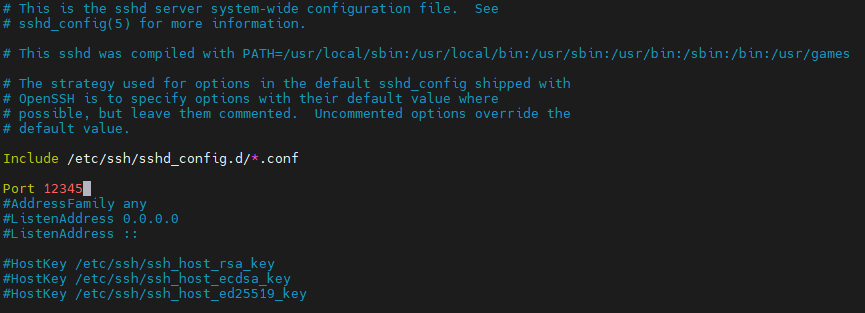
설정 변경 후 ssh 를 재시작하여 변경 사항을 적용
ubuntu 24.04 LTS 버전은 ssh daemon(sshd)도 reload 해주어야 함
sudo systemctl daemon-reload
sudo systemctl restart ssh
ssh 서비스가 동작하고 있는지 확인
sudo systemctl status ssh
방화벽 설정
openssh-server 설치 시 ufw 방화벽도 함께 설치되어 설정이 필요
# ssh 기본 포트 차단
sudo ufw deny 22

# 설정한 ssh port 허용
sudo ufw allow 12345
SSH 연결
# 본인이 설정한 port, username@host 입력
ssh -p 12345 username@localhost
'OS > Linux' 카테고리의 다른 글
| The following upgrades have been deferred due to phasing: (0) | 2025.04.07 |
|---|